
Excire Blog

PetaPixel-Repost: Fotoverwaltung mit Excire und Alternativen zu Adobe

© Ivor Rackham

Table of Contents

Dieser Beitrag basiert auf einem Artikel von Ivor Rackham, der ursprünglich auf PetaPixel veröffentlicht wurde. Wir fassen die wichtigsten Punkte auf Deutsch zusammen.

Wer viel fotografiert, sammelt schnell Zehntausende von Bildern. Die Frage ist: Wie verwaltet, entwickelt und bearbeitet man sie effizient – und muss es dafür zwingend Adobe sein?

Ivor Rackham hat sich genau diese Frage gestellt und teilt in seinem englischsprachigen Artikel seine Erfahrungen mit alternativen Workflows. Hier sind die wichtigsten Erkenntnisse:

Die Grenzen des Adobe-Workflows

Adobe Lightroom und Photoshop sind etablierte Werkzeuge – aber nicht für alle Fotografinnen und Fotografen die beste Wahl. Rackham weist darauf hin, dass die Grundlogik der Oberflächen weit zurückreicht: bei Lightroom bis 2007, bei Photoshop sogar bis 1990. Seitdem sind zahlreiche Alternativen entstanden, die für manche Workflows besser passen.

Konkrete Schwachstellen laut Rackham:

  • Verschlagwortung ist nach wie vor zeitaufwendig und manuell
  • Geschwindigkeit lässt bei großen Bibliotheken nach
  • Bei der RAW-Entwicklung sieht Rackham spezialisierte Tools im Vorteil
  • Photoshop hat eine steile Lernkurve, die viele abschreckt

KI-gestützte Fotoverwaltung mit Excire Foto

Rackham wechselte zu Excire Foto – und das aus gutem Grund. Statt mühsam Schlagwörter manuell zu vergeben, verschlagwortet die KI die Fotos automatisch.

Besonders beeindruckend:

  • Freitextsuche: Einfache Begriffe wie „Sonnenaufgang über einer Insel“ oder „Papageitaucher“ eingeben – die KI findet passende Bilder, auch ohne vorherige Verschlagwortung
  • Gesichtserkennung: Personen werden erkannt – sogar auf historischen Familienfotos aus der viktorianischen Zeit
  • Automatisches Foto-Culling: Unscharfe Bilder oder Fotos mit geschlossenen Augen werden automatisch erkannt und zum Aussortieren vorgeschlagen
  • Ästhetik-Bewertung: Bei Bildserien bewertet Excire Aufnahmen nach ästhetischen Kriterien und hilft bei der Fotoauswahl


„Nachdem ich meine vorhandenen Bildordner in die Software importiert hatte, wurden sie analysiert und automatisch mit Schlagwörtern versehen.“Ivor Rackham, aus dem Englischen übersetzt

RAW-Entwicklung auf höchstem Niveau

Bei der RAW-Entwicklung sieht Rackham DxO PhotoLab klar im Vorteil – besonders in den Bereichen:

  • Objektiv- und Sensorkorrekturen
  • Rauschreduzierung
  • U Point Technology für lokale Anpassungen
  • KI-gestützte Maskierung

Bearbeitung ohne Photoshop

Auch bei der eigentlichen Bildbearbeitung gibt es starke Alternativen:

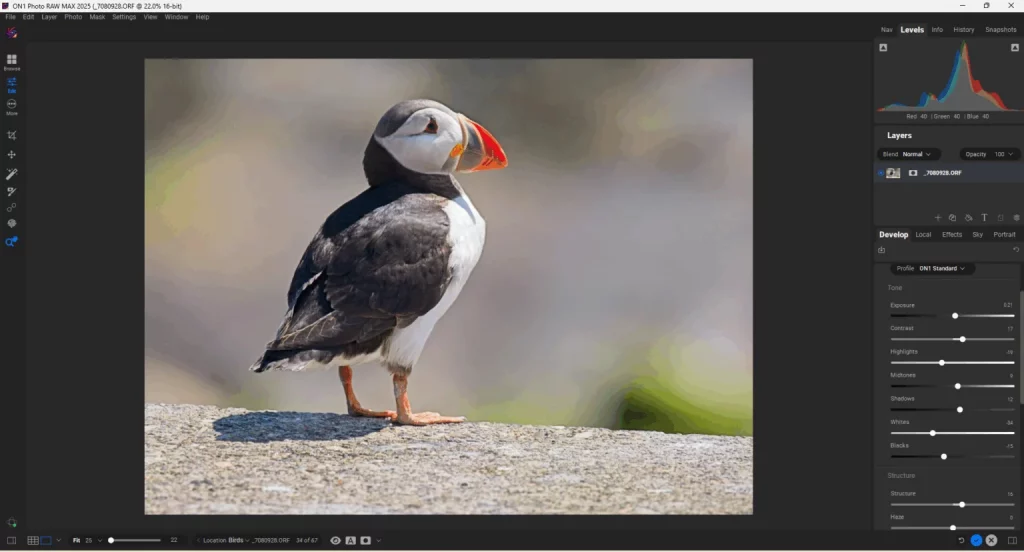
  • ON1 Photo RAW – intuitiv, leistungsstark und mit dem kostenlosen Editor „Effects“
  • Affinity Photo – kostenlos mit Canva-Konto, inzwischen Teil von Canva
  • DxO Nik Collection – einzigartiger Bearbeitungsansatz mit beeindruckenden Ergebnissen

Wichtiger Hinweis zu den Kosten

Rackham hebt außerdem hervor: Excire Foto, DxO PhotoLab, die Nik Collection und ON1 Photo RAW sind mit Einmallizenzen erhältlich – ohne laufendes Abo.

Den kompletten Originalartikel von Ivor Rackham finden Sie auf PetaPixel.

Kennen Sie Excire Foto noch nicht? Dann probieren Sie die kostenlose Testversion von Excire Foto aus.

Jetzt Excire Foto 2025 14 Tage lang kostenlos testen

Excire Foto Office Edition

The Excire Photo Office Edition is a special solution for companies and team use. In addition to the usual AI power for simple and intuitive photo management, it has the following additional features:

  • Hide option for irrelevant keywords
  • Function to adopt folder names as keywords
  • Sharing via SFTP
  • Two-stage role concept
  • Right-of-use period as a supplement to the metadata and corresponding filter option
  • Shared database on a network drive

Language & version

Supported languages

German & English

Current version

1.2.5

Minimum system requirements

Processor

Mehrkernprozessor mit 64-bit und AVX Unterstützung
Multi-core processor with 64-bit and AVX support. Older AMD processors like the AMD Phenom™ II X6 1100T and AMD Phenom™ II X (also known as AMD Athlon II X4 640) are not supported. Intel Core 2 Duo processors are not supported.

Operating system

Windows 11 (x86 & 64-bit). Note: The Windows version is not optimized for Snapdragon or ARM processors.

Memory

Minimum 8GB RAM is required. However, 16GB or more is recommended.

Hard disk

The Excire databases require about 250 MB for 100,000 photos.
The preview storage will then be about 25 GB
at the highest quality, including raw formats,
and when a preview is generated for each photo.

Excire Search 2024 - Trial

Language & version

Supported languages
German, English, French, Italian & Spanish
Current version

4.0.0

Minimum system requirements

Processor
Multicore processor with 64-bit and AVX support Older AMD processors like AMD Phenom(tm) II X6 1100T and AMD Phenom(tm) II X (also known as AMD Athlon II X4 640) are not supported. Intel Core 2 Duo processors are not supported.
Operating system
macOS 10.14 (or newer) or Windows 10 (64-bit) or Windows 11 (64bit)
Memory
8GB RAM. However, for large catalogs (> 100,000 photos) we recommend 16GB or more
Hard disk
375 MB of free hard disk space for the base installation and additional memory for image signatures. For example, an Adobe Lightroom catalog of 100,000 images requires about another 800 MB of additional memory.

Excire Search 2024

Excire Search is the perfect solution for all Adobe Lightroom Classic users. The smart Lightroom plugin analyzes and tags photos automatically and extends Lightroom with powerful AI search functions. With just a few clicks, Excire Search finds exactly the photos you are looking for. This makes image management fun again and hours of image searching a thing of the past. 

Available for Windows and macOS and now brand new in the 2024 version with integrated duplicate finder!

Language & version

Supported languages
German, English, French, Italian & Spanish
Current version

4.1.3

Minimum system requirements

Processor
Multicore processor with 64-bit and AVX support Older AMD processors like AMD Phenom(tm) II X6 1100T and AMD Phenom(tm) II X (also known as AMD Athlon II X4 640) are not supported. Intel Core 2 Duo processors are not supported.
Operating system
macOS 10.14 (or newer) or Windows 10 (64-bit) or Windows 11 (64bit)
Lightroom (Classic)
Version 6 (or newer)
Memory
8GB RAM. However, for large catalogs (> 100,000 photos) we recommend 16GB or more
Hard disk
375 MB of free hard disk space for the base installation and additional memory for image signatures. For example, an Adobe Lightroom catalog of 100,000 images requires about another 800 MB of additional memory.

Excire Search 2022 - Trial

Language & version

Supported languages
German, English, French, Italian & Spanish
Current version
3.1.1

Minimum system requirements

Processor
Multicore processor with 64-bit and AVX support Older AMD processors like AMD Phenom(tm) II X6 1100T and AMD Phenom(tm) II X (also known as AMD Athlon II X4 640) are not supported. Intel Core 2 Duo processors are not supported.
Operating system
macOS 10.14 (or newer) or Windows 10 (64-bit) or Windows 11 (64bit)
Memory
8GB RAM. However, for large catalogs (> 100,000 photos) we recommend 16GB or more
Hard disk
375 MB of free hard disk space for the base installation and additional memory for image signatures. For example, an Adobe Lightroom catalog of 100,000 images requires about another 800 MB of additional memory.

Excire Foto 2024 - Trial

Note for existing Excire Foto customers: Excire Foto users have to keep in mind for testing that the previous Excire database will be modified when the program is started for the first time. Thus a switch back to older versions is not possible without a backup. We therefore recommend creating a backup before using Excire Foto 2024. How to do this is described here.

Language & version

Supported languages
German & English
Current version

3.2.0

Minimum system requirements

Processor
Multi-core processor with 64-bit and AVX support Older AMD Prozessoren like AMD Phenom(tm) II X6 1100T und AMD Phenom(tm) II X (also known as AMD Athlon II X4 640) are not supported. Intel Core 2 Duo processors are not supported.
Operating system
macOS 10.14 (or newer) or Windows 10 (64-bit) or Windows 11 (64bit)
Memory
Minimum 8GB RAM is required. However, 16GB or more is recommended.
Hard disk
The Excire Foto databases will take up approx. 250MB for 100,000 photos, and the previews approx. 25GB if highest-quality previews are generated for each photo.

Excire Search 2022

Excire Search is the perfect solution for all Adobe Lightroom Classic users. The smart Lightroom plugin analyzes and tags photos automatically and extends Lightroom with powerful AI search functions. With just a few clicks, Excire Search finds exactly the photos you are looking for. This makes image management fun again and hours of image searching a thing of the past. 

Available for Windows and macOS and now brand new in the 2022 version with integrated duplicate finder!

Language & version

Supported languages
German, English, French, Italian & Spanish
Current version
3.1.1

Minimum system requirements

Processor
Multicore processor with 64-bit and AVX support Older AMD processors like AMD Phenom(tm) II X6 1100T and AMD Phenom(tm) II X (also known as AMD Athlon II X4 640) are not supported. Intel Core 2 Duo processors are not supported.
Operating system
macOS 10.14 (or newer) or Windows 10 (64-bit) or Windows 11 (64bit)
Lightroom (Classic)
Version 6 (or newer)
Memory
8GB RAM. However, for large catalogs (> 100,000 photos) we recommend 16GB or more
Hard disk
375 MB of free hard disk space for the base installation and additional memory for image signatures. For example, an Adobe Lightroom catalog of 100,000 images requires about another 800 MB of additional memory.

Excire Foto 2024

Excire’s flagship program boasts dazzling new features and enhanced AI technology. All-new tools offer AI-powered free-text search, GPS-search, and intelligent aesthetics assessment of individual photos. Additionally, AI upgrades ensure better results in facial recognition, similarity search, and automatic keywording.

Excire Foto 2024 retains all core features from Excire Foto 2022, and the Excire Analytics extension is now fully integrated into the new program.

Highlights of the 2024 version include:

  • X-prompt AI for powerful free-text image search
  • X-tetics AI for instant evaluation of photos
  • GPS-based search and editable GPS coordinates
  • Intuitive slideshow maker for professional photo displays
  • New status labels for folders and collections
  • Improved AI-search performance thanks to revamped AI models

Excire Account Management and Activation

Language & version

Supported languages
German & English
Current version

3.2.0

Minimum system requirements

Processor
Multi-core processor with 64-bit and AVX support Older AMD Prozessoren like AMD Phenom(tm) II X6 1100T und AMD Phenom(tm) II X (also known as AMD Athlon II X4 640) are not supported. Intel Core 2 Duo processors are not supported.
Operating system
macOS 10.14 (or newer) or Windows 10 (64-bit) or Windows 11 (64bit)
Memory
Minimum 8GB RAM is required. However, 16GB or more is recommended.
Hard disk
The Excire Foto databases will take up approx. 250MB for 100,000 photos, and the previews approx. 25GB if highest-quality previews are generated for each photo.

Excire Foto 2022

Excire Foto 2022 is a powerful and innovative software designed for easy photo management and quick content-based browsing. Numerous smart features help you get organized and find the photos you are looking for.

These are the highlights of the new 2022 version:

  • Duplicate finder with numerous setting options
  • Support of PSD files
  • match accuracy for similarity searches is now adjustable
  • the maximum number of search results has been increased to 50,000
  • Support of Windows network paths


We recommend Windows users to install the Microsoft Raw image extension: Download

Language & version

Supported languages
German & English
Current version

2.2.4

Minimum system requirements

Processor
Multi-core processor with 64-bit and AVX support Older AMD Prozessoren like AMD Phenom(tm) II X6 1100T und AMD Phenom(tm) II X (also known as AMD Athlon II X4 640) are not supported. Intel Core 2 Duo processors are not supported.
Operating system
macOS 10.14 (or newer) or Windows 10 (64-bit) or Windows 11 (64bit)
Memory
Minimum 8GB RAM is required. However, 16GB or more is recommended.
Hard disk
The Excire Foto databases will take up approx. 250MB for 100,000 photos, and the previews approx. 25GB if highest-quality previews are generated for each photo.