
Excire Foto Office Edition

Smart photo management and a
perfectly organized database for your
professional teamwork!

  • No credit card required
  • Ready to go in just a few minutes
  • No cloud dependency

Excire Foto Office Edition - AI-Powered Photo Management for Effective Teamwork

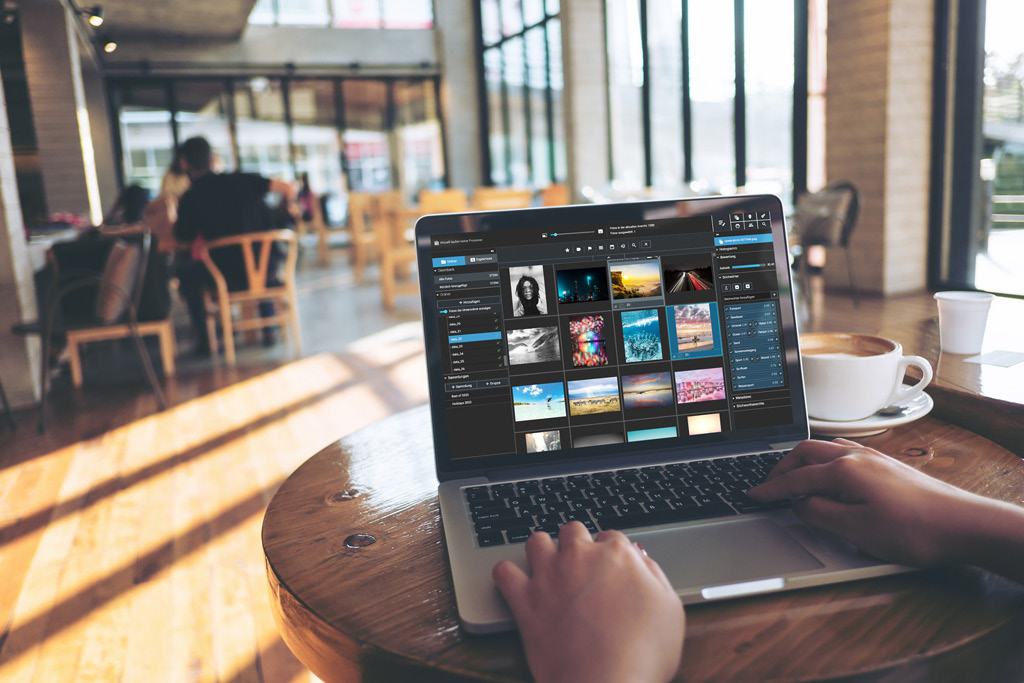
Excire Foto Office Edition boasts automatic AI-powered tagging so you can easily organize images and videos. With free text, people, and GPS search, you can find your content quickly and effectively. Thanks to no-cloud, on-premise use; role-based access control; and network support, the software is ideal for companies and teams looking for a secure, flexible media-management solution. A silent installer, easy license management, and FTP sharing facilitate deployment and collaboration.

Experience fast, cost-effective media management - without complicated IT setups.

In addition to Excire Foto 2025’s cutting-edge search & organization features, Excire Foto Office Edition offers:

  • A team solution with user roles & access rights
  • Unlimited local & network databases
  • Sharing via FTP
  • Transfer folder names as keywords
  • Hide irrelevant keywords
  • Save and filter by media license usage duration
  • Central license & user management
  • Silent installer for easy IT deployment (Windows)

Everything your team needs for its
day-to-day photo work.

Search for content and text in photos

Formulate your search in complete sentences—just like with ChatGPT. Or search specifically for subjects or text in photos. No manual tagging required - content is recognized automatically.

Face and People Search

Find all photos of a specific person in seconds, or filter by characteristics such as smiling or the direction of their gaze—all thanks to modern AI, running locally on your computer.

Identify & Remove Duplicates

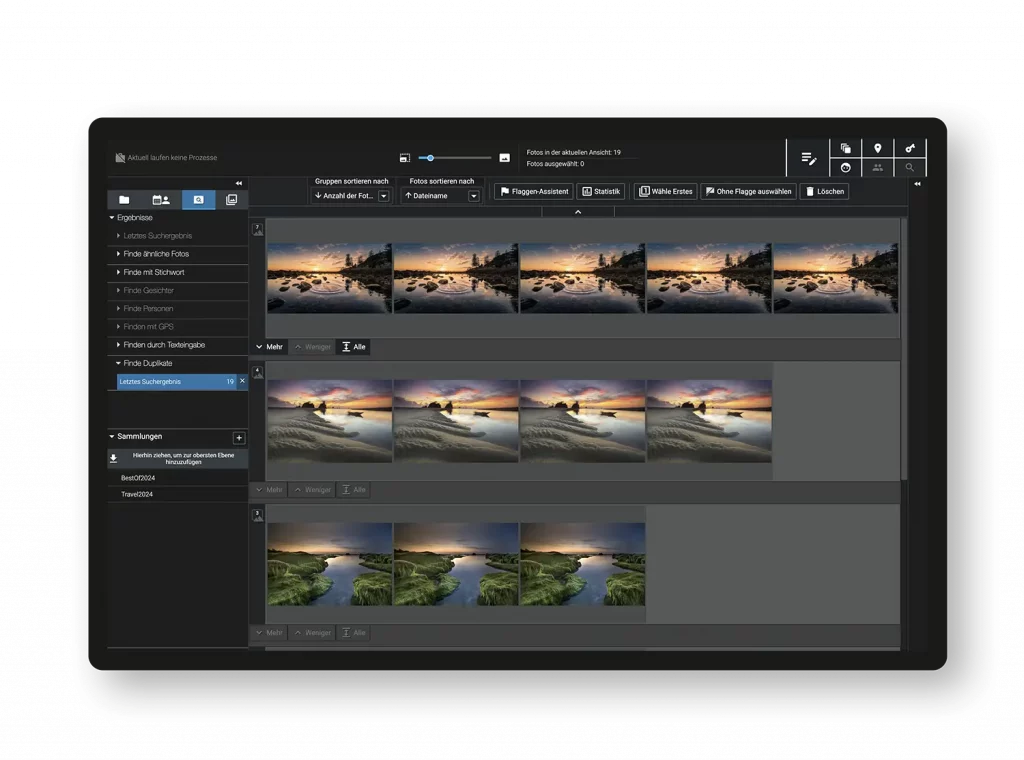
The Duplicate Finder detects exact and nearly identical photos in a matter of seconds and helps keep your photo collection organized at all times.

Metadata editing and search

If you want to make the most of your shared image database, then it’s essential to ensure your files are filterable by business-relevant criteria. With Excire Foto, you can add individual metadata to each photo, then use it to retrieve specific images at any time. The Office Edition includes an additional metadata field for license usage duration.

Team Roles Concept

Two roles—Standard and Restricted—give you full control over who is allowed to modify the database.

Local data storage, without the cloud

Your photos are analyzed exclusively on-premises—in compliance with the GDPR, without being uploaded to the cloud.

Unlimited Network Databases

Create as many local and network databases as you like and share content via FTP.

Silent Installer & License Management

Centralized license and user management, along with a silent installer, simplify IT deployment.

All new features in Excire Foto 2027 also apply to the Office Edition.

The Office Edition shares the same search technology as Excire Foto 2027—every innovation in the
current version is automatically available to your team.

Smart text recognition

Search photos for visible text—from street signs to documents.

Interactive Map View

Search photos for visible text—from street signs to documents.

Smart filter bar & timeline

Advanced filtering options and a visual timeline for an efficient workflow.

Overview of Photo Selection

View, rate, and select the best photos with just a few clicks.

3x3 Grid & Peaking Mode

More precise image evaluation in preview mode—sharpness and composition at a glance.

Additional interface upgrades

Experience a streamlined layout, flexible side panels, and convenient clipboard support for a smoother workflow.

Customer references

Get up and running quickly, without an IT project.

Download, silent installer, done. Excire Foto Office Edition runs on your work computer or on the network—without any complicated setup and without relying on the cloud.

Significantly more affordable than a
traditional DAM system.

Traditional DAM System

Initial costs
Approx. 7,000–10,000 € (one-time payment)

Ongoing Costs
Approx. 1,400–2,000 €/year for maintenance

Excire Foto Office Edition


Initial costs

No setup required


Ongoing Costs

399€ 289€/year per user; €99/year starting with the third license

Transparent pricing —
even for growing teams.

1. & 2. license, respectively

399€ 289€/ year per user

from 3rd license

99 €/year for each additional license

Example: 5 licenses

875 €/Total per year

All prices are exclusive of sales tax. · Volume discounts apply automatically starting with the third license.

GDPR-compliant · SSL-encrypted order

Excire Foto Office Edition FAQs

There are two roles: a standard user, who can perform all functions, including adding folders to the application, and a restricted user, who primarily has read-only access and cannot execute certain functions. All users who are members of the “restricted” group in the Orgadmin area are considered restricted users. How this group is created and how users can be added to it is explained in the following document: Excire Foto Office Edition Setup

A “restricted” user can utilize the full AI power of Excire Foto Office Edition to find relevant photos and create collections. However, they cannot perform the following functions:

  • Add folders
  • Load and save metadata
  • Edit and delete metadata
  • Add and delete keywords
  • Delete, rename, and move photos
  • Delete, rename, and move folders
  • Synchronize folders

Additionally, various attributes in the settings are not editable for a “restricted” user.

After downloading our software, you need to install Excire Foto Office Edition on your computer. For macOS, please unzip the corresponding ZIP file and mount the appropriate disk image (DMG file). You then simply need to start our installation program, which will guide you step by step through the installation.

Windows users only need to launch the downloaded executable file (*.exe) and follow the installation instructions.

The details of the setup and installation are described in the following document: Excire Foto Office Edition Setup

For our business customers, we have a dedicated help section, which also provides access to our specialized support. You can find it at the following address: https://business-support.excire.com

When employees are invited via the “Orgadmin” tool, they will receive an email with the corresponding link to create an Excire account. For more details, please refer to the following document: Excire Foto Office Edition Setup

Our AI has been trained with over 5 million annotated photos, which shows that training an AI is very resource-intensive. Furthermore, such training requires specialized hardware. Since neither of these is available on customer machines, unfortunately, it is not possible for you to retrain the AI yourself.

Our AI has been trained with over 5 million photos to recognize approximately 650 different contents and find relevant photos for various search queries. However, this process occurs a priori on specialized hardware, so the AI does not learn further during operation.

We continuously train the AI and provide you with updates in the form of software updates.

Our software does not upload photos to a cloud; instead, it analyzes all photos locally on your computer.

Our software runs on Windows 10 and Windows 11, as well as on macOS (version 11 and above). Please note that a shared database can only be accessed from the same operating system. Therefore, sharing between Windows and Mac computers is not possible.

As a subscriber, you will receive regular updates and upgrades that include bug fixes, optimizations, and new features.

Simultaneous access to the shared database is not possible. If the database is in use, you will be shown who is currently using it, allowing you to coordinate with each other. Additionally, you can use your local database in parallel.

The Office Edition was designed for use with Windows 11.

Ready for a
searchable photo archive?

Try Excire Foto Office Edition free for 30 days — with no
Credit card, no obligation.

We're happy to answer any questions you may have about our product.

GDPR-compliant · Local data storage · Software from Germany

    Discover our solution for your company's image management

    Do you have any questions about our product? Send us a
    message with your inquiry or request a consultation appointment.


    If you plan to have only one user, please use Excire Fotos 2027.
    Excire Foto 2027.


    By contacting us, you agree that your personal data may be used for the purposes of necessary processing. You also agree to the Privacy Policy. Privacy policy einverstanden.

    Excire Foto Office Edition

    The Excire Photo Office Edition is a special solution for companies and team use. In addition to the usual AI power for simple and intuitive photo management, it has the following additional features:

    • Hide option for irrelevant keywords
    • Function to adopt folder names as keywords
    • Sharing via SFTP
    • Two-stage role concept
    • Right-of-use period as a supplement to the metadata and corresponding filter option
    • Shared database on a network drive

    Language & version

    Supported languages

    German & English

    Current version

    2.0.1

    Minimum system requirements

    Processor

    Mehrkernprozessor mit 64-bit und AVX Unterstützung
    Multi-core processor with 64-bit and AVX support. Older AMD processors like the AMD Phenom™ II X6 1100T and AMD Phenom™ II X (also known as AMD Athlon II X4 640) are not supported. Intel Core 2 Duo processors are not supported.

    Operating system

    Windows 11 (x86 & 64-bit). Note: The Windows version is not optimized for Snapdragon or ARM processors.

    Memory

    Minimum 8GB RAM is required. However, 16GB or more is recommended.

    Hard disk

    The Excire databases require about 250 MB for 100,000 photos.
    ca. 900 MB. Der Vorschau-Speicher umfasst dann ca.
    at the highest quality, including raw formats,
    and when a preview is generated for each photo.

    Excire Search 2024 - Trial

    Language & version

    Supported languages
    German, English, French, Italian & Spanish
    Current version

    4.0.0

    Minimum system requirements

    Processor
    Multicore processor with 64-bit and AVX support Older AMD processors like AMD Phenom(tm) II X6 1100T and AMD Phenom(tm) II X (also known as AMD Athlon II X4 640) are not supported. Intel Core 2 Duo processors are not supported.
    Operating system
    macOS 10.14 (or newer) or Windows 10 (64-bit) or Windows 11 (64bit)
    Memory
    8GB RAM. However, for large catalogs (> 100,000 photos) we recommend 16GB or more
    Hard disk
    375 MB of free hard disk space for the base installation and additional memory for image signatures. For example, an Adobe Lightroom catalog of 100,000 images requires about another 800 MB of additional memory.

    Excire Search 2024

    Excire Search is the perfect solution for all Adobe Lightroom Classic users. The smart Lightroom plugin analyzes and tags photos automatically and extends Lightroom with powerful AI search functions. With just a few clicks, Excire Search finds exactly the photos you are looking for. This makes image management fun again and hours of image searching a thing of the past. 

    Available for Windows and macOS and now brand new in the 2024 version with integrated duplicate finder!

    Language & version

    Supported languages
    German, English, French, Italian & Spanish
    Current version

    4.1.3

    Minimum system requirements

    Processor
    Multicore processor with 64-bit and AVX support Older AMD processors like AMD Phenom(tm) II X6 1100T and AMD Phenom(tm) II X (also known as AMD Athlon II X4 640) are not supported. Intel Core 2 Duo processors are not supported.
    Operating system
    macOS 10.14 (or newer) or Windows 10 (64-bit) or Windows 11 (64bit)
    Lightroom (Classic)
    Version 6 (or newer)
    Memory
    8GB RAM. However, for large catalogs (> 100,000 photos) we recommend 16GB or more
    Hard disk
    375 MB of free hard disk space for the base installation and additional memory for image signatures. For example, an Adobe Lightroom catalog of 100,000 images requires about another 800 MB of additional memory.

    Excire Search 2022 - Trial

    Language & version

    Supported languages
    German, English, French, Italian & Spanish
    Current version
    3.1.1

    Minimum system requirements

    Processor
    Multicore processor with 64-bit and AVX support Older AMD processors like AMD Phenom(tm) II X6 1100T and AMD Phenom(tm) II X (also known as AMD Athlon II X4 640) are not supported. Intel Core 2 Duo processors are not supported.
    Operating system
    macOS 10.14 (or newer) or Windows 10 (64-bit) or Windows 11 (64bit)
    Memory
    8GB RAM. However, for large catalogs (> 100,000 photos) we recommend 16GB or more
    Hard disk
    375 MB of free hard disk space for the base installation and additional memory for image signatures. For example, an Adobe Lightroom catalog of 100,000 images requires about another 800 MB of additional memory.

    Excire Foto 2024 - Trial

    Note for existing Excire Foto customers: Excire Foto users have to keep in mind for testing that the previous Excire database will be modified when the program is started for the first time. Thus a switch back to older versions is not possible without a backup. We therefore recommend creating a backup before using Excire Foto 2024. How to do this is described here.

    Language & version

    Supported languages
    German & English
    Current version

    3.2.0

    Minimum system requirements

    Processor
    Multi-core processor with 64-bit and AVX support Older AMD Prozessoren like AMD Phenom(tm) II X6 1100T und AMD Phenom(tm) II X (also known as AMD Athlon II X4 640) are not supported. Intel Core 2 Duo processors are not supported.
    Operating system
    macOS 10.14 (or newer) or Windows 10 (64-bit) or Windows 11 (64bit)
    Memory
    Minimum 8GB RAM is required. However, 16GB or more is recommended.
    Hard disk
    The Excire Foto databases will take up approx. 250MB for 100,000 photos, and the previews approx. 25GB if highest-quality previews are generated for each photo.

    Excire Search 2022

    Excire Search is the perfect solution for all Adobe Lightroom Classic users. The smart Lightroom plugin analyzes and tags photos automatically and extends Lightroom with powerful AI search functions. With just a few clicks, Excire Search finds exactly the photos you are looking for. This makes image management fun again and hours of image searching a thing of the past. 

    Available for Windows and macOS and now brand new in the 2022 version with integrated duplicate finder!

    Language & version

    Supported languages
    German, English, French, Italian & Spanish
    Current version
    3.1.1

    Minimum system requirements

    Processor
    Multicore processor with 64-bit and AVX support Older AMD processors like AMD Phenom(tm) II X6 1100T and AMD Phenom(tm) II X (also known as AMD Athlon II X4 640) are not supported. Intel Core 2 Duo processors are not supported.
    Operating system
    macOS 10.14 (or newer) or Windows 10 (64-bit) or Windows 11 (64bit)
    Lightroom (Classic)
    Version 6 (or newer)
    Memory
    8GB RAM. However, for large catalogs (> 100,000 photos) we recommend 16GB or more
    Hard disk
    375 MB of free hard disk space for the base installation and additional memory for image signatures. For example, an Adobe Lightroom catalog of 100,000 images requires about another 800 MB of additional memory.

    Excire Foto 2024

    Excire’s flagship program boasts dazzling new features and enhanced AI technology. All-new tools offer AI-powered free-text search, GPS-search, and intelligent aesthetics assessment of individual photos. Additionally, AI upgrades ensure better results in facial recognition, similarity search, and automatic keywording.

    Excire Foto 2024 retains all core features from Excire Foto 2022, and the Excire Analytics extension is now fully integrated into the new program.

    Highlights of the 2024 version include:

    • X-prompt AI for powerful free-text image search
    • X-tetics AI for instant evaluation of photos
    • GPS-based search and editable GPS coordinates
    • Intuitive slideshow maker for professional photo displays
    • New status labels for folders and collections
    • Improved AI-search performance thanks to revamped AI models

    Excire Account Management and Activation

    Language & version

    Supported languages
    German & English
    Current version

    3.2.0

    Minimum system requirements

    Processor
    Multi-core processor with 64-bit and AVX support Older AMD Prozessoren like AMD Phenom(tm) II X6 1100T und AMD Phenom(tm) II X (also known as AMD Athlon II X4 640) are not supported. Intel Core 2 Duo processors are not supported.
    Operating system
    macOS 10.14 (or newer) or Windows 10 (64-bit) or Windows 11 (64bit)
    Memory
    Minimum 8GB RAM is required. However, 16GB or more is recommended.
    Hard disk
    The Excire Foto databases will take up approx. 250MB for 100,000 photos, and the previews approx. 25GB if highest-quality previews are generated for each photo.

    Excire Foto 2022

    Excire Foto 2022 is a powerful and innovative software designed for easy photo management and quick content-based browsing. Numerous smart features help you get organized and find the photos you are looking for.

    These are the highlights of the new 2022 version:

    • Duplicate finder with numerous setting options
    • Support of PSD files
    • match accuracy for similarity searches is now adjustable
    • the maximum number of search results has been increased to 50,000
    • Support of Windows network paths


    We recommend Windows users to install the Microsoft Raw image extension: Download

    Language & version

    Supported languages
    German & English
    Current version

    2.2.4

    Minimum system requirements

    Processor
    Multi-core processor with 64-bit and AVX support Older AMD Prozessoren like AMD Phenom(tm) II X6 1100T und AMD Phenom(tm) II X (also known as AMD Athlon II X4 640) are not supported. Intel Core 2 Duo processors are not supported.
    Operating system
    macOS 10.14 (or newer) or Windows 10 (64-bit) or Windows 11 (64bit)
    Memory
    Minimum 8GB RAM is required. However, 16GB or more is recommended.
    Hard disk
    The Excire Foto databases will take up approx. 250MB for 100,000 photos, and the previews approx. 25GB if highest-quality previews are generated for each photo.