
Excire Blog

Excire Foto 2027 Is Here: Find Faster, Organize Easier, Cull Better

Table of Contents

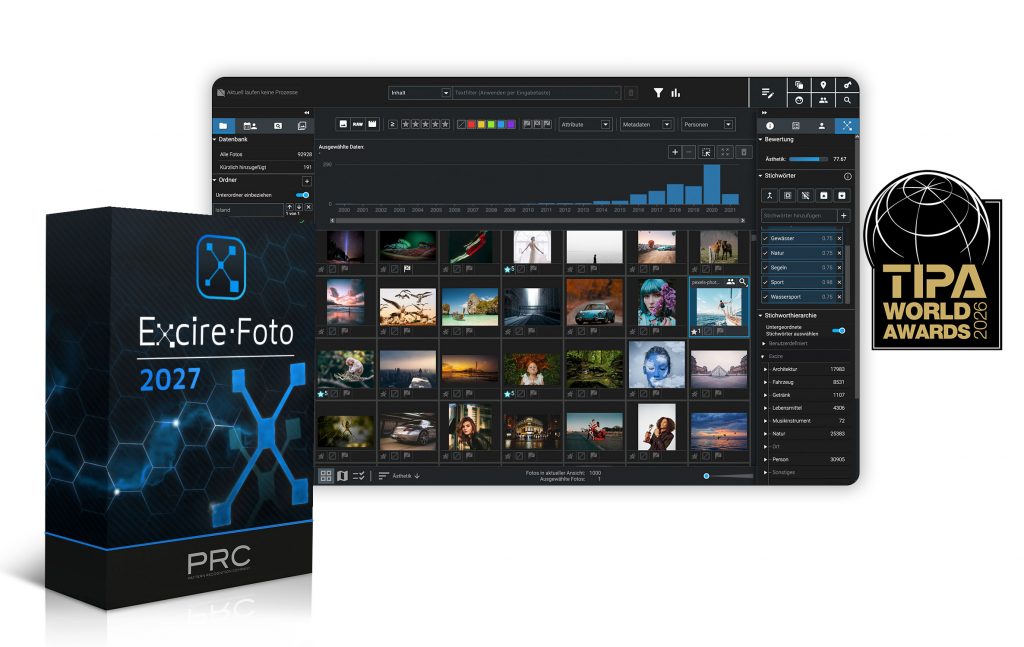
Managing a growing photo and video library can quickly become overwhelming. Thousands of files, countless shoots, and years of accumulated content make finding the right image increasingly difficult. That’s exactly why we created Excire Foto—and with Excire Foto 2027, we’re taking AI-powered media management to the next level.

The latest version introduces powerful new tools for searching, organizing, navigating, and selecting photos and videos. Whether you’re a photographer, content creator, marketer, or professional media manager, Excire Foto 2027 helps you work faster and stay organized without sacrificing privacy.

Best of all, Excire Foto continues to follow the same philosophy our users appreciate: all processing happens locally on your computer, with no cloud dependency and no subscription fees.

Discover all features of Excire Foto 2027:

Intelligent Text Recognition: Search the Words Inside Your Photos

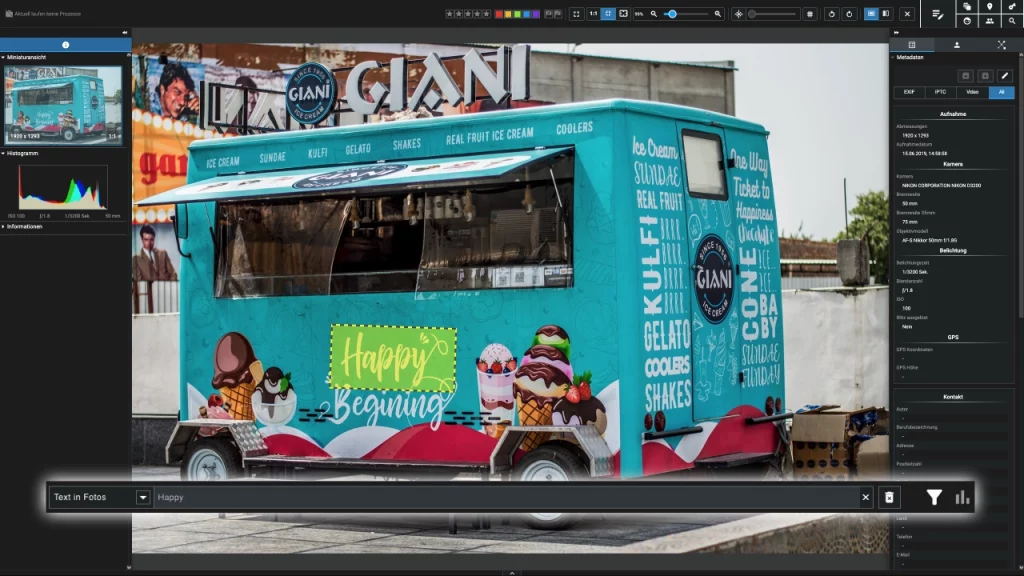
One of the most exciting additions in Excire Foto 2027 is intelligent text recognition.

The AI can automatically detect and index text appearing within images, including street signs, storefronts, posters, documents, information boards, and other visible lettering. This makes your photo library searchable in entirely new ways.

Instead of relying solely on metadata, people recognition, or visual subjects, you can now search for specific words and phrases that appear inside your images. To make verification easy, recognized text can also be highlighted directly within the image preview.

For photographers who frequently document travel, events, business activities, or research projects, this feature can dramatically reduce the time spent searching for specific images.
Explore Your Archive with the New World Map View

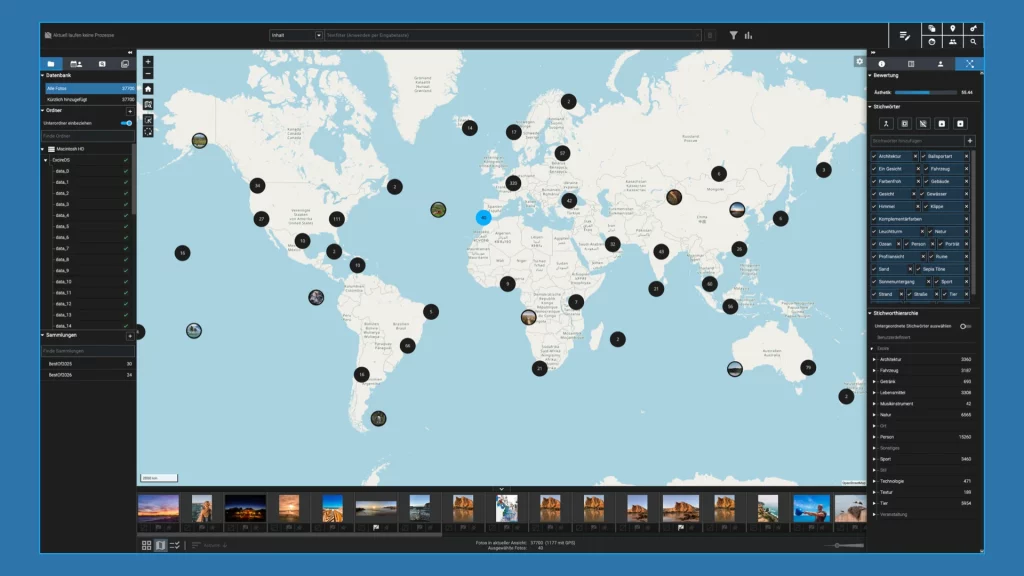
Photos often tell the story of where we have been. The new World Map View helps bring those stories to life.

Images and videos containing GPS information—or files that have been assigned location data afterward—can now be displayed on an interactive world map. This allows you to visually explore your travels, client projects, assignments, and adventures based on location.

The map view is especially valuable for travel photographers, landscape photographers, street photographers, and documentary storytellers who want to rediscover images through geography rather than folders and filenames.
Navigate Memories with the Visual Timeline

Excire Foto 2027 also introduces a completely new visual timeline.

Browsing large media collections becomes much more intuitive when you can move through them chronologically. Whether you're searching for photos from a vacation, wedding, event, or multi-day assignment, the timeline makes it easier to jump directly to the period you're looking for.

Combined with Excire’s existing AI-powered search and filtering capabilities, the timeline provides a powerful new way to navigate even the largest archives.

More Powerful Search and Filtering

Search has always been at the heart of Excire Foto, and version 2027 makes it even better.

A new unified search bar allows you to search photo content, recognized text, and metadata from a single location. At the same time, expanded filtering tools make it easier to narrow down large collections and quickly find exactly what you need.

Available filters include:

  • File format
  • Image dimensions
  • Aspect ratio
  • Ratings and labels
  • Camera and lens information
  • People
  • Capture dates


Search results can also be sorted in multiple ways, allowing you to adapt the workflow to your personal preferences and project requirements.

Faster Photo Selection and Improved Workflows

Excire Foto 2027 introduces several enhancements designed to streamline image review and selection.

The new Light Table View provides an efficient workspace for comparing, rating, and selecting large groups of images. Whether you're culling a wedding, reviewing travel photos, or sorting an event shoot, the new interface helps you make decisions more quickly.

Additional tools include a 3×3 composition grid, focus peaking for evaluating sharpness, quick comparison modes, and improved previews. Together, these features make image selection faster and more reliable.

The release also includes expanded metadata options, additional search capabilities, greater interface customization, and new options for video export and collection sharing.
Your Photos Stay Private

As with every Excire product, privacy remains a top priority.

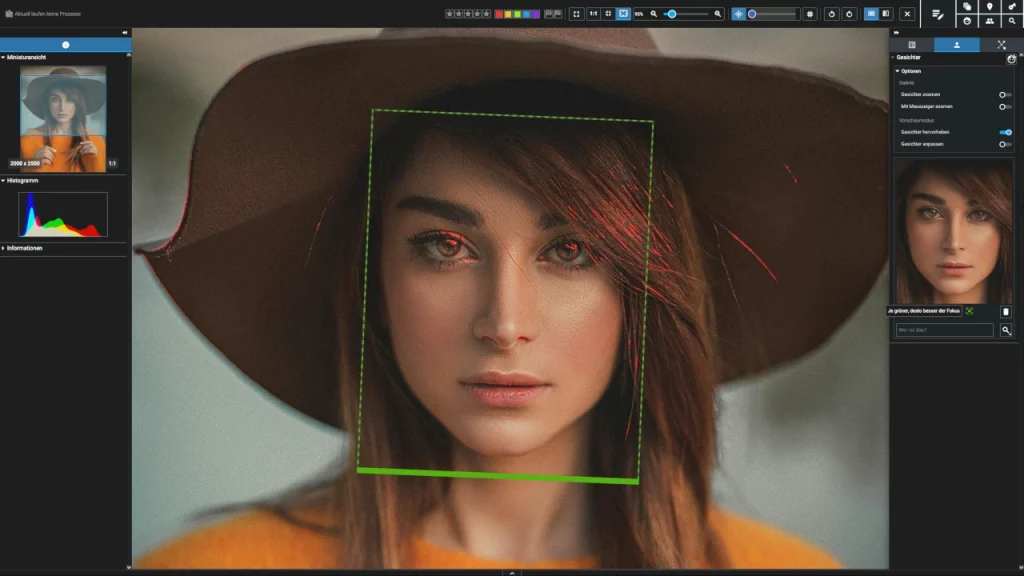
All AI processing takes place locally on your own computer. Your photos and videos never need to be uploaded to the cloud, giving you complete control over your data at all times.

For photographers, businesses, and organizations working with sensitive content, this local-first approach provides an important layer of security and peace of mind.

Availability and Pricing

Excire Foto 2027 will be available starting June 16, 2026.

For a limited time, new customers can purchase a perpetual license at the introductory price of $219 USD (€199). After the launch promotion ends, the regular list price will be $249 USD (€229).

Existing users of previous Excire Foto versions will benefit from discounted upgrade offers. In addition, everyone can try Excire Foto 2027 free of charge with a 14-day trial before purchasing.

Ready to Experience Excire Foto 2027?

From intelligent text recognition and geographic exploration to a visual timeline and faster photo selection, Excire Foto 2027 delivers the most comprehensive set of AI-powered media management tools we have ever offered.

If you're looking for a faster, smarter way to manage your photo and video archive while keeping your files private and under your control, now is the perfect time to try Excire Foto 2027.

Try Excire Foto 2027 for free for 14 days

Excire Foto Office Edition

The Excire Photo Office Edition is a special solution for companies and team use. In addition to the usual AI power for simple and intuitive photo management, it has the following additional features:

  • Hide option for irrelevant keywords
  • Function to adopt folder names as keywords
  • Sharing via SFTP
  • Two-stage role concept
  • Right-of-use period as a supplement to the metadata and corresponding filter option
  • Shared database on a network drive

Language & version

Supported languages

German & English

Current version

1.2.5

Minimum system requirements

Processor

Mehrkernprozessor mit 64-bit und AVX Unterstützung
Multi-core processor with 64-bit and AVX support. Older AMD processors like the AMD Phenom™ II X6 1100T and AMD Phenom™ II X (also known as AMD Athlon II X4 640) are not supported. Intel Core 2 Duo processors are not supported.

Operating system

Windows 11 (x86 & 64-bit). Note: The Windows version is not optimized for Snapdragon or ARM processors.

Memory

Minimum 8GB RAM is required. However, 16GB or more is recommended.

Hard disk

The Excire databases require about 250 MB for 100,000 photos.
The preview storage will then be about 25 GB
at the highest quality, including raw formats,
and when a preview is generated for each photo.

Excire Search 2024 - Trial

Language & version

Supported languages
German, English, French, Italian & Spanish
Current version

4.0.0

Minimum system requirements

Processor
Multicore processor with 64-bit and AVX support Older AMD processors like AMD Phenom(tm) II X6 1100T and AMD Phenom(tm) II X (also known as AMD Athlon II X4 640) are not supported. Intel Core 2 Duo processors are not supported.
Operating system
macOS 10.14 (or newer) or Windows 10 (64-bit) or Windows 11 (64bit)
Memory
8GB RAM. However, for large catalogs (> 100,000 photos) we recommend 16GB or more
Hard disk
375 MB of free hard disk space for the base installation and additional memory for image signatures. For example, an Adobe Lightroom catalog of 100,000 images requires about another 800 MB of additional memory.

Excire Search 2024

Excire Search is the perfect solution for all Adobe Lightroom Classic users. The smart Lightroom plugin analyzes and tags photos automatically and extends Lightroom with powerful AI search functions. With just a few clicks, Excire Search finds exactly the photos you are looking for. This makes image management fun again and hours of image searching a thing of the past. 

Available for Windows and macOS and now brand new in the 2024 version with integrated duplicate finder!

Language & version

Supported languages
German, English, French, Italian & Spanish
Current version

4.1.3

Minimum system requirements

Processor
Multicore processor with 64-bit and AVX support Older AMD processors like AMD Phenom(tm) II X6 1100T and AMD Phenom(tm) II X (also known as AMD Athlon II X4 640) are not supported. Intel Core 2 Duo processors are not supported.
Operating system
macOS 10.14 (or newer) or Windows 10 (64-bit) or Windows 11 (64bit)
Lightroom (Classic)
Version 6 (or newer)
Memory
8GB RAM. However, for large catalogs (> 100,000 photos) we recommend 16GB or more
Hard disk
375 MB of free hard disk space for the base installation and additional memory for image signatures. For example, an Adobe Lightroom catalog of 100,000 images requires about another 800 MB of additional memory.

Excire Search 2022 - Trial

Language & version

Supported languages
German, English, French, Italian & Spanish
Current version
3.1.1

Minimum system requirements

Processor
Multicore processor with 64-bit and AVX support Older AMD processors like AMD Phenom(tm) II X6 1100T and AMD Phenom(tm) II X (also known as AMD Athlon II X4 640) are not supported. Intel Core 2 Duo processors are not supported.
Operating system
macOS 10.14 (or newer) or Windows 10 (64-bit) or Windows 11 (64bit)
Memory
8GB RAM. However, for large catalogs (> 100,000 photos) we recommend 16GB or more
Hard disk
375 MB of free hard disk space for the base installation and additional memory for image signatures. For example, an Adobe Lightroom catalog of 100,000 images requires about another 800 MB of additional memory.

Excire Foto 2024 - Trial

Note for existing Excire Foto customers: Excire Foto users have to keep in mind for testing that the previous Excire database will be modified when the program is started for the first time. Thus a switch back to older versions is not possible without a backup. We therefore recommend creating a backup before using Excire Foto 2024. How to do this is described here.

Language & version

Supported languages
German & English
Current version

3.2.0

Minimum system requirements

Processor
Multi-core processor with 64-bit and AVX support Older AMD Prozessoren like AMD Phenom(tm) II X6 1100T und AMD Phenom(tm) II X (also known as AMD Athlon II X4 640) are not supported. Intel Core 2 Duo processors are not supported.
Operating system
macOS 10.14 (or newer) or Windows 10 (64-bit) or Windows 11 (64bit)
Memory
Minimum 8GB RAM is required. However, 16GB or more is recommended.
Hard disk
The Excire Foto databases will take up approx. 250MB for 100,000 photos, and the previews approx. 25GB if highest-quality previews are generated for each photo.

Excire Search 2022

Excire Search is the perfect solution for all Adobe Lightroom Classic users. The smart Lightroom plugin analyzes and tags photos automatically and extends Lightroom with powerful AI search functions. With just a few clicks, Excire Search finds exactly the photos you are looking for. This makes image management fun again and hours of image searching a thing of the past. 

Available for Windows and macOS and now brand new in the 2022 version with integrated duplicate finder!

Language & version

Supported languages
German, English, French, Italian & Spanish
Current version
3.1.1

Minimum system requirements

Processor
Multicore processor with 64-bit and AVX support Older AMD processors like AMD Phenom(tm) II X6 1100T and AMD Phenom(tm) II X (also known as AMD Athlon II X4 640) are not supported. Intel Core 2 Duo processors are not supported.
Operating system
macOS 10.14 (or newer) or Windows 10 (64-bit) or Windows 11 (64bit)
Lightroom (Classic)
Version 6 (or newer)
Memory
8GB RAM. However, for large catalogs (> 100,000 photos) we recommend 16GB or more
Hard disk
375 MB of free hard disk space for the base installation and additional memory for image signatures. For example, an Adobe Lightroom catalog of 100,000 images requires about another 800 MB of additional memory.

Excire Foto 2024

Excire’s flagship program boasts dazzling new features and enhanced AI technology. All-new tools offer AI-powered free-text search, GPS-search, and intelligent aesthetics assessment of individual photos. Additionally, AI upgrades ensure better results in facial recognition, similarity search, and automatic keywording.

Excire Foto 2024 retains all core features from Excire Foto 2022, and the Excire Analytics extension is now fully integrated into the new program.

Highlights of the 2024 version include:

  • X-prompt AI for powerful free-text image search
  • X-tetics AI for instant evaluation of photos
  • GPS-based search and editable GPS coordinates
  • Intuitive slideshow maker for professional photo displays
  • New status labels for folders and collections
  • Improved AI-search performance thanks to revamped AI models

Excire Account Management and Activation

Language & version

Supported languages
German & English
Current version

3.2.0

Minimum system requirements

Processor
Multi-core processor with 64-bit and AVX support Older AMD Prozessoren like AMD Phenom(tm) II X6 1100T und AMD Phenom(tm) II X (also known as AMD Athlon II X4 640) are not supported. Intel Core 2 Duo processors are not supported.
Operating system
macOS 10.14 (or newer) or Windows 10 (64-bit) or Windows 11 (64bit)
Memory
Minimum 8GB RAM is required. However, 16GB or more is recommended.
Hard disk
The Excire Foto databases will take up approx. 250MB for 100,000 photos, and the previews approx. 25GB if highest-quality previews are generated for each photo.

Excire Foto 2022

Excire Foto 2022 is a powerful and innovative software designed for easy photo management and quick content-based browsing. Numerous smart features help you get organized and find the photos you are looking for.

These are the highlights of the new 2022 version:

  • Duplicate finder with numerous setting options
  • Support of PSD files
  • match accuracy for similarity searches is now adjustable
  • the maximum number of search results has been increased to 50,000
  • Support of Windows network paths


We recommend Windows users to install the Microsoft Raw image extension: Download

Language & version

Supported languages
German & English
Current version

2.2.4

Minimum system requirements

Processor
Multi-core processor with 64-bit and AVX support Older AMD Prozessoren like AMD Phenom(tm) II X6 1100T und AMD Phenom(tm) II X (also known as AMD Athlon II X4 640) are not supported. Intel Core 2 Duo processors are not supported.
Operating system
macOS 10.14 (or newer) or Windows 10 (64-bit) or Windows 11 (64bit)
Memory
Minimum 8GB RAM is required. However, 16GB or more is recommended.
Hard disk
The Excire Foto databases will take up approx. 250MB for 100,000 photos, and the previews approx. 25GB if highest-quality previews are generated for each photo.